Looks like Adobe has come up with a Flash to iPhone converter. Probably will be built into CS5. This is not surprising as it seems like an obvious extension of Adobe AIR.
SoundObject
Here’s a sound utility class to make playing sound in Flash a little easier. The example files show some basic features and usage of the class.
http://code.google.com/p/webdevils/downloads/list
The SoundObject Class is basically a wrapper for the Sound and SoundChannel classes. These can be a little tricky or confusing to work with in their raw forms. The SoundObject Class strives to provide all of the expected functionality in an intuitive package.
Usage is simple, make an instance of the Class pass along the URL to an mp3 file. Call the play method to play() the sound, stop() the sound or pause() to pause the sound. Much simpler than using Sound and SoundChannel.
This has a few other methods and could use a few more. This could definitely see an update in the near future.
Iterator
Here’s a Design Pattern from ActionScript 3.0 with Design Patterns. I find myself using this utility class more and more, so I thought I’d post an example. http://code.google.com/p/webdevils/downloads/list
The Iterator pattern handles looping through lists of data. These types of tasks are very common. I find myself working on this type of thing all the time.The obvious choice is to make an Array. But this leaves you writing code each time to handle every situation that might arise. Not to mention that making these systems around an Array doesn’t provide any of the OOP goodness that makes your work easier, more reliable and easier to update.
When would use the Iterator and why? You could use the Iterator any time you had lists of things that you need to cycle through. This could be groups of MovieClips. It could be data received from the server. Dynamic gallery. It’s good any time you find yourself looping through an Array and working with all it’s elements.
The Iterator pattern is based around two classes: Collection and Iterator. The Collection class holds the data and the Iterator class access the data. Collections can be written to hold any type of data. Iterators can be written to access data in various ways from the Collection. Basic types of Iterators might access data from first to last, reverse or randomly.
The Collection class is a simple class that acts like an Array. It contains an Array as a private property to store data. The Collection provides public methods to access elements of it’s Array and a method to set the Iterator to use with the data.The Collection class must define a function to set the Iterator.
The Iterators must define the following public methods, next, hasNext and reset. The next method returns the item out of the Collection. The hasNext method returns false if you have reached the last item in your Collection. And, the reset method starts the Iterator over again.
The easiest way to work with the Collection for myself is to store Objects.Object are flexible can store any amount of data.
Just finished a small job for Level Three
http://www.level-3.com/website/
I just created this Flash banner. The idea here was to create a flexible banner that could display example work. Work needed to be updated periodically. XML to the rescue. The SWF loads an XML file that describes everything displayed in the banner. The motion was handled with Tweener.
Drupal and Flash?
This looks like a very interesting article on interfacing Flash with Drupal.
Updated Class library
I have recently updated the class library and improved the SimpleScrollbar and SimpleScrollText classes. These are now much more reliable and useful.
SoundObject Class
I just added a simple wrapper class that simplifies working with Sound in AS3.
The class is SoundObject. Import from com.webdevils.media.
SoundObject supports the following public methods:
load, play, pause and stop.
Moonmap
Ryan Medeiros sent me this image with the question would it be possible to create a flash movie that generated something like this?
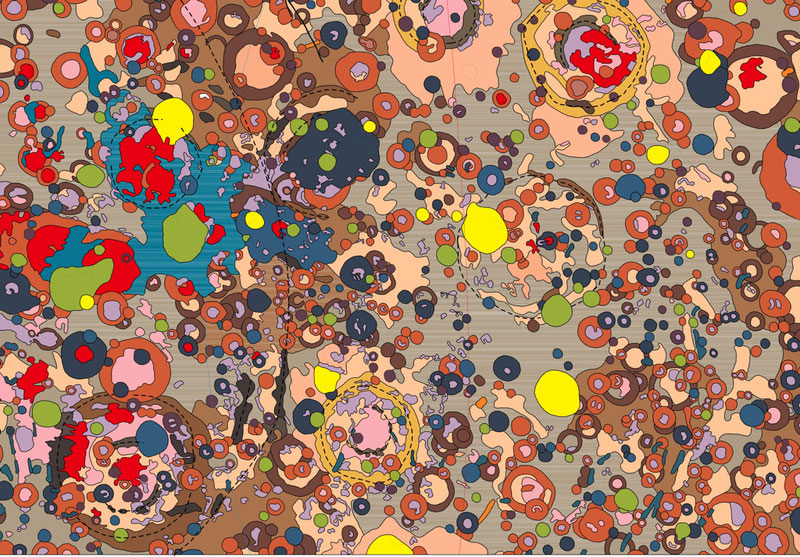 Like I say t all things, sure why not! Obviously to create this in Flash requires some thought. The success also depends on what you want to get out of this. Trying to recreate a natural system with AS is not easy. Though it may look random there are some subtle and complex patterns hidden in an image like this.Trying to recreate the image exactly might leave you disappointed. Giving yourself the latitude to come up with something close is obviously more likely to produce success.
The best place to start is with the image,by examining it very closely. A close look will start to give you an dea of the systems that you need to create.
The first thing that I noticed was hte strong color palette. The colors are not random. Most are less satuarated and fall in a range of browns and pinks. The few brighter colors that appear, appear less often. The red and yellow appear far less often than the browns and pinks. There is also a bright blue.
The shapes are mostly circular. But not perfect circles. Often one shape appears within another. Usualy the inner shape is near the center and doesn’t meet the edge of it’s container. The inner shapes are almost always in a brighter color.
After examining the image for a while, and knowing that it is a map of mineral deposits on the moon. I begin to see a pattern where the circular shapes represent craters. Thinking this way you begin to see two layers of shapes. The lower layer seems to give me the impression of the regular landscape of the moon. Comprised of shapes that are not circular, the shapes on this layer relate more to topographical shapes. The upper layer is mostly circluar shapes.Then there are a few dashed lines that run across the image.
Each shape appears as a solid fill with a single pixel black stroke. A few the shapes show some horizontal streaks in the fill. I’m going to assume that these are artifacts from compression and ignore this.
The sizes of the shapes also contribute to the unique look of the image. Most of the circular shapes fall in the small to tiny category. While few of the shapes are medium to large. Let’s say samll to tiny is 40 pixels and smaller. Medium to large is larger than 40 pixels.
There is a lot more to see and examine. The longer you look the more you will see. What I’ve covered here would give you plenty to work with. Of course the more you study and the more you can measure and quantify the more accurate the final work will be.
How would you go about creating something like this? Drawing shapes with a stroke and solid fill is easily accomplished with the Drawing API. Methods of the graphics subclass like: beginFill, lineStyle, lineTo and curveTo would cover it all.
You might decide to work with regular shapes like ellipses and or rectangles. This would not match the image exactly but could still get the essence of the image look artful. In this case you could also make use of drawEllipse, drawRect.
For ease of working I think I would try and break the work into several classes. A class to represent each of the shapes would be a convenient way to handle them. This would make it easier to create an alogrithm to generate and distribute these shapes across the entire image.
I pointed out earlier that the image seemed to have shapes of different types in a fore ground and background layer. This might require different classes to generate each of the different types of shapes.
There’s a few thoughts to get started on this. Maybe I’ll come back to this later.
Sample Project with Gallery
Here is a sample project that makes use of the Load_Content, Button_Group and ImageLoader classes.
I posted some videos describing the process here:http://vimeo.com/user312541/videos
I’m looking for a better service. One that doesn’t resize the images. I would like to keep them at 800×600. If anyone has any suggestions please post a commont.
Flash projects to keep an eye on
This project looks very intersting. It was started by the people that put together Fuse Kit. Which was an excellent project.
http://labs.adobe.com/wiki/index.php/Talk:Pixel_Bender_Toolkit
A very interesting idea, ripe with possibilities.
http://www.gskinner.com/blog/archives/2008/12/gtween_beta_3_t.html
Another tweening engine.